Transferring files from your host machine into DaDesktop
One of the most requested features is now available: copying files directly from the Trainer's own laptop or desktop into the DaDesktop environment. These could be slide decks, ISO images for nested virtualization setups that let you spin up multiple servers and desktops, or any files your training requires.
Our latest Windows 10 and nearly all Linux templates now include a simple drag-and-drop file transfer. Just pull files from your host machine (your personal laptop or desktop) and drop them into the DaDesktop machine.
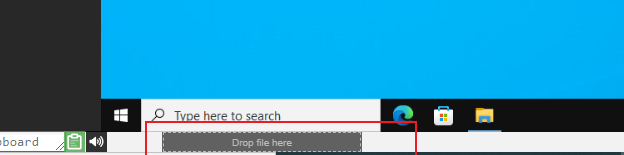
For now, transfers are limited to one file at a time. If you need to move several files, package them into a zip archive and drag that over instead. The transfer chunks large files for efficient delivery, working best over a fast fiber connection. Any folders inside the archive will be preserved.
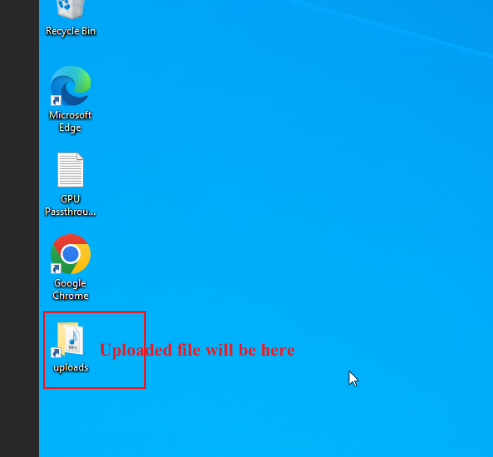
On Linux templates, you won't see a desktop shortcut for the Uploads folder like you do in Windows. Instead, find your transferred files here:
/home/student/uploads-to-dadesktop
To recap:
OS Templates that currently have this feature enabled
- Debian 12 - v20240314 and newer
- Ubuntu 22.04 - v20240314 and newer
- Ubuntu 24.04 - v20240314 and newer
- Windows 10 - v67 and newer
OS Templates that do not have this feature enabled (as yet)
- Debian 11
- Almalinux
- Kali-linux
- Any older versions of the templates
This feature is still in its early release phase, so look out for more additions soon.
If you have any thoughts or feedback, please reach out through the DaDesktop Technical support chat.